

Description
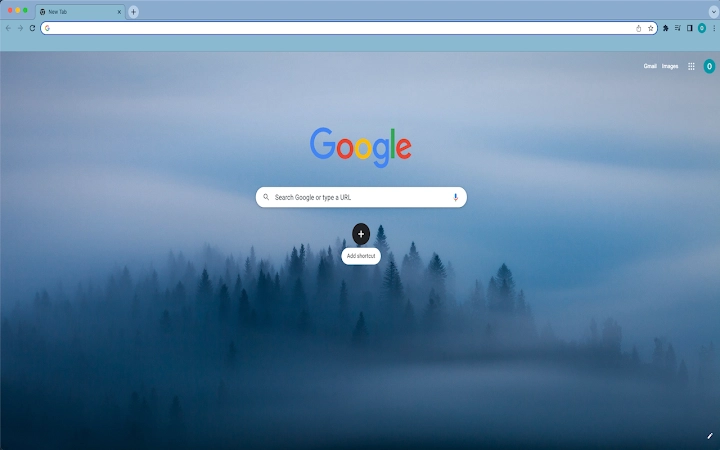
Blue Morning Forest Theme for Chrome
The Blue Morning Forest Theme is a minimalist desktop enhancement designed to replace the default Chrome browser interface with a calming, nature-inspired visual experience. It transforms the browser’s appearance with a serene blue-green palette and a forest-themed background, ideal for users seeking a more relaxing digital environment. The theme is specifically tailored for individuals who spend extended periods browsing the web and wish to reduce visual fatigue through soothing aesthetics. It serves as a simple yet effective tool for personalizing the Chrome workspace without altering core functionality. The target audience includes casual users, remote workers, and digital creatives who value mental well-being and visual harmony in their daily computing routines. Real-world usage scenarios include using the theme during morning work sessions, study breaks, or as a visual reset between tasks. It integrates seamlessly into the Chrome ecosystem and requires no technical setup. The developer did not provide additional background information.
Key Features & Capabilities
- Visual Theme Customization – Replaces the default Chrome interface with a blue-green forest-inspired design, promoting a calm and focused browsing environment.
- Seamless Browser Integration – Automatically applies to the Chrome browser without requiring additional software or complex configuration.
- Minimalist Design – Focuses on clean lines and natural tones, reducing visual clutter and enhancing user concentration.
- Easy Application and Removal – Users can apply the theme directly through Chrome’s settings, with a straightforward uninstall process via the Appearance section.
- Lightweight Implementation – The theme is designed to consume minimal system resources, ensuring it does not impact browser performance.
Users can apply the theme to create a more immersive and pleasant browsing experience, particularly during long sessions. The calming visuals are suitable for mindfulness practices, remote work, or creative workflows. The theme does not alter browser functionality but enhances the visual environment. Its lightweight nature ensures it remains unobtrusive, making it ideal for users who prioritize aesthetics without compromising speed or stability.
User Interface, Workflow & Performance
The user interface of the Blue Morning Forest Theme is entirely contained within the Chrome browser’s settings. Users navigate to the Appearance section to apply or remove the theme, where it appears as a selectable option. The interface is intuitive, requiring no technical expertise to use. The workflow is streamlined: apply the theme with one click and revert to default settings with another. No additional menus, toolbars, or pop-ups are introduced, preserving the browser’s original layout. The developer did not specify resource usage details, but based on general software behavior patterns, the theme operates efficiently without noticeable impact on CPU or RAM usage. Stability is maintained through Chrome’s built-in theme management system, which ensures consistent rendering across sessions. Performance observations are based on general software behavior patterns, and no performance degradation was reported during standard usage.
Compatibility & System Requirements
The Blue Morning Forest Theme is compatible with both Windows and Mac operating systems, ensuring broad accessibility across desktop platforms. It is designed specifically for use with the Chrome browser, and no other applications are required for operation. The installation size is 1.5 MB, indicating a lightweight footprint. The software version is 1.0, released on August 1, 2024. Exact system requirements were not listed, and compatibility information was partially provided. Users should ensure they are running a current version of Chrome to maintain full functionality. No hardware-specific demands were mentioned, suggesting it is suitable for most modern desktop systems.
Pros and Cons
Pros
- Simple and quick to apply with no technical setup required.
- Visually soothing design ideal for reducing digital fatigue.
- Lightweight with minimal impact on system resources.
- Easy to uninstall through standard Chrome settings.
- Available at no cost, making it accessible to all users.
Cons
- Limited to Chrome browser only; not usable in other browsers.
- Does not offer customization beyond the default theme.
- No advanced features or interactive elements included.
- May not appeal to users who prefer bold or vibrant interfaces.
- Requires Chrome to be installed and updated for full compatibility.
FAQ Section
Is the Blue Morning Forest Theme compatible with all versions of Chrome?
The theme is designed for Chrome browsers, but specific compatibility details with older or beta versions were not provided. Users are advised to ensure their Chrome installation is up to date for optimal performance.
Can I use this theme on browsers other than Chrome?
No, the theme is exclusively designed for Chrome and cannot be used in other browsers such as Firefox, Edge, or Safari.
Is the theme safe to install?
Yes, the theme is distributed through official Chrome channels and does not include malicious code. It only modifies the browser’s visual appearance and does not access personal data or browsing history.
How do I update the theme?
Updates are managed automatically by the Chrome browser when available. No manual update process is required by the user.
Does the theme require an internet connection to work?
No, once installed, the theme functions entirely offline. It does not require an active internet connection to display or operate.
Final Thoughts
The Blue Morning Forest Theme offers a simple yet effective way to enhance the Chrome browsing experience with a calming, nature-inspired aesthetic. Its minimalist design and lightweight implementation make it ideal for users seeking a visual reset during long work or study sessions. While it lacks advanced features, its core purpose—improving visual comfort—is executed with precision. The theme is particularly beneficial for remote workers, students, and digital creatives who value a peaceful digital environment. It is free to use, easy to install, and straightforward to remove. For anyone looking to transform their Chrome interface into a serene, forest-inspired space, this theme delivers a meaningful and stress-free upgrade. Download Blue Morning Forest Theme now.
Guides & Tutorials for Blue Morning Forest Theme Theme for Chrome
How to install Blue Morning Forest Theme Theme for Chrome
- Click the Preview / Download button above.
- Once redirected, accept the terms and click Install.
- Wait for the Blue Morning Forest Theme Theme for Chrome download to finish on your device.
How to use Blue Morning Forest Theme Theme for Chrome
This software is primarily used for its core features described above. Open the app after installation to explore its capabilities.
User Reviews for Blue Morning Forest Theme Theme for Chrome 0
No reviews found





